No-Code Automation for Beginners: 3 Zapier vs Make Recipes
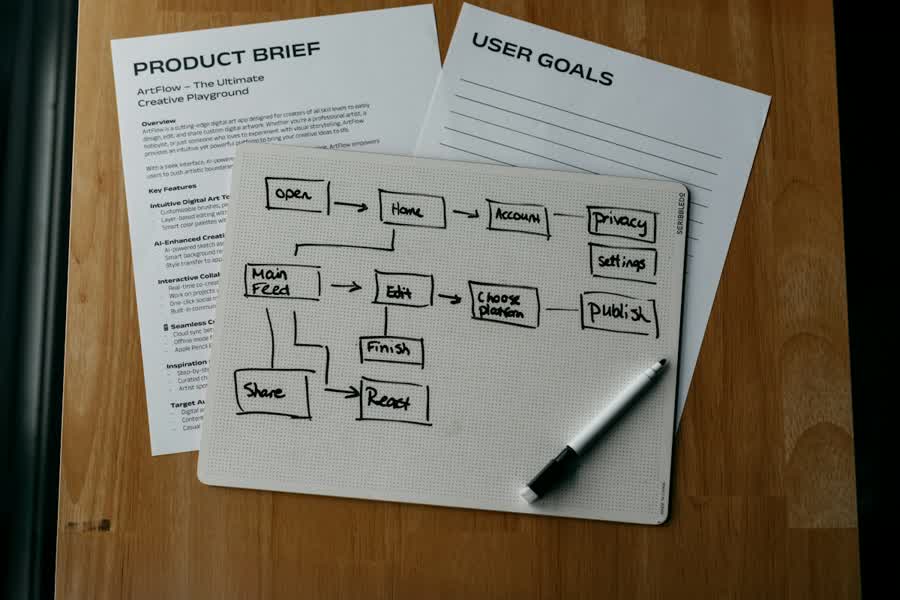
No-code automation for beginners means connecting apps with triggers and actions so repetitive email and spreadsheet work runs without writing code. In one afternoon you can ship three builds: Gmail label to Google Sheets, Google Form to a notification, and a new spreadsheet row to a calendar event or follow-up email.
Zapier is usually easier on day one. Make is often cheaper per operation and stronger for multi-step flows. The decision rule is simple: start on Zapier if you want the shortest path; move to Make when steps multiply and cost per run matters.
I built my first flow after copying the same email fields into a sheet every Friday. The first working run felt small, but it removed a chore I used to postpone. Official guides from the Zapier Help Center, Make documentation, and Google Workspace Help are the sources to keep open while you click.
🧭 What no-code automation for beginners really is
🧩 Triggers, actions, and one afternoon
No-code automation for beginners is not a second job. It is a short list of boring tasks you already do by hand. If a task happens weekly, uses the same fields, and does not need judgment every time, it is a candidate.
Keep scope tiny. One trigger, one or two actions, one success check. Expand only after 3 clean runs over 7 days. That habit protects you from half-finished “mega zaps” that fail silently.
Automate only what you can explain in one sentence. If you cannot name the trigger and the outcome, wait.
📘 Vocabulary you need before you click
🗂 Terms in plain words
| Term | Meaning | Example |
|---|---|---|
| Trigger | The event that starts the flow | New Gmail with a label |
| Action | What the tool does next | Create a Sheets row |
| Step | One module in the chain | Filter, then create event |
| Run / operation | One execution (billing unit differs by product) | One successful row write |
| Filter | Continue only if a condition matches | Subject contains “Invoice” |
| Formatter | Clean or reshape text/dates | Parse a date string |
If you mix these words, debugging gets slow. Say the trigger out loud, then the first action. That two-line script is the core of No-code automation for beginners.

Pair automation with focus blocks if your day is fragmented. A simple Pomodoro and time-blocking system keeps setup sessions short enough to finish.
⚖️ Zapier vs Make for email and spreadsheets
📊 Side-by-side decision table
| Factor | Zapier | Make |
|---|---|---|
| Free tier | Limited tasks; enough to learn | Limited operations; enough to learn |
| Pricing model | Mostly task-based usage | Mostly operation-based usage |
| Learning curve | Gentler for first flows | Steeper; visual canvas helps later |
| Multi-step | Solid; can get pricey as steps grow | Strong for branching and multi-step |
| Error handling | Clear history; easy retries | Detailed scenario history; more knobs |
| Best for | Fast start, simple email↔Sheets | Cost control on multi-step recipes |
Do not memorize dollar amounts from memory. Plans change. Check the current pricing page on each site before you commit. For No-code automation for beginners, the model matters more than last month’s sticker price.
Decision rule: if your first three flows stay under a handful of steps, Zapier’s path is usually faster. If you already know you need routers, iterators, and many modules, Make’s canvas and operation model often ages better. Switch only after one tool feels limiting, not after one blog comparison.
🛠️ Three starter recipes to build first
✉️ Recipe 1 — Gmail label → Google Sheets row
- Create a Gmail label such as “Log-to-Sheet”.
- Connect Gmail and Google Sheets in your automation tool.
- Trigger on new email with that label.
- Map From, Subject, Date, and a short snippet to columns.
- Add a filter so newsletters never write a row.
- Test with one labeled email; confirm the row.
- Turn on the flow and label three real emails.
📝 Recipe 2 — Google Form → Slack or email notification
- Build a short Google Form with only required fields.
- Trigger on each new form response.
- Compose a message with the key answers.
- Send to Slack or email (pick one channel first).
- Filter empty or spam-like answers if needed.
- Submit a test response and verify delivery.
- Share the form only after 2 clean tests within 24 hours.
📅 Recipe 3 — Sheets row → Calendar or follow-up email
- Use a sheet with a status column set to “Ready”.
- Trigger on new or updated rows where status is Ready.
- Create a Calendar event or draft a follow-up email.
- Format dates carefully; set one time zone explicitly.
- Write a “Done” status back to the sheet when possible.
- Test with one row; check calendar or sent mail.
- Only then process a real backlog of five rows.

These three recipes are the practical core of No-code automation for beginners. Finish them before you chase fancy AI steps. Habit design helps too: keep each build under a 2-minute rule and habit stacking start so you actually open the editor.
Scheduled automations run in a time zone. Before you set “9 AM,” check what that means for a teammate in another city.
🧯 Common failures and quick fixes
🔧 Seven issues you will meet
- Wrong trigger polling — You expect instant mail, but the app polls every 1 to 15 minutes. Wait 15 minutes or use a webhook-style trigger when available.
- Duplicate runs — The same email or row fires twice. Add an idempotency column or a “already logged” filter.
- Time zone mismatch — Calendar events land on the wrong day. Set the account and the step to one explicit zone.
- Rate limits — Bursts of rows hit API caps. Batch less often or split peak hours.
- Broken auth — Tokens expire after password changes, often within 24 hours. Reconnect the app and retest.
- Empty fields — Mapping looks fine until a blank subject arrives. Require fields or set defaults.
- Silent filters — A filter blocks everything. Log a test path without the filter, then re-enable it.
When a run fails, read the history before rebuilding. Most “mystery bugs” in No-code automation for beginners are auth, filters, or time zones—not the idea of automation itself.
Never point a new flow at a production sheet without a test tab. One bad loop can flood hundreds of rows in 10 minutes.
🛑 When not to automate and a 2-week plan
🚫 Leave these tasks manual
Skip automation when the cost of a wrong send is high: legal wording, payroll changes, sensitive HR messages, or one-off client exceptions. Also skip when the process still changes every week. Stabilize the checklist for 30 days first; then encode it.
If you need human judgment on every item, a dashboard plus a reminder is enough. Automation should remove typing, not remove thinking.
Budget the time before you open the editor. The numbers below are what the three recipes took me on a normal laptop, including one failed test each. If a build runs past 90 minutes, stop, write down where it broke, and return the next day with fresh eyes.
| Build | Time budget | Runs before trusting it |
|---|---|---|
| Recipe 1 — Gmail → Sheets | 45 minutes | 3 runs over 3 days |
| Recipe 2 — Form → Notification | 30 minutes | 2 runs in 2 days |
| Recipe 3 — Row → Calendar | 60 minutes | 5 runs over 5 days |
| Weekly review | 15 minutes | Every 7 days |
📆 Two weeks from zero to three flows
- Days 1–2 — Pick Zapier or Make; connect Gmail and Sheets only.
- Days 3–5 — Ship Recipe 1; require three clean live runs.
- Days 6–8 — Ship Recipe 2 to one notification channel.
- Days 9–11 — Ship Recipe 3 with explicit time zones.
- Days 12–14 — Review histories, kill duplicates, write a one-page runbook.

That schedule is enough for No-code automation for beginners without turning your evenings into unpaid engineering. If a day slips, shrink the recipe—do not stack a fourth idea.
Keep a “kill switch” note: which account owns the flow, where history lives, and how to pause it in one click.
❓ Frequently asked questions
❓ Is no-code automation for beginners safe for work email?
Yes if you start with low-risk labels and test sheets. Avoid sensitive folders until filters and audits are solid.
❓ Should no-code automation for beginners start on Zapier or Make?
Start on Zapier for speed. Move to Make when multi-step cost and branching matter. Check current pricing pages before you pay.
❓ How many steps should my first flow have?
Two or three. Trigger, optional filter, one action. Add formatters only when a field breaks.
❓ Why did my calendar event land on the wrong day?
Time zones. Align the spreadsheet, the automation account, and the calendar, then retest.
❓ Can I automate decisions that need judgment?
Not well. Use automation for logging and alerts; keep the decision with a person.
❓ What if free tier limits stop me mid-week?
Pause nonessential flows, reduce polling, and review the vendor’s current free allowances on the pricing page.
No-code automation for beginners is three small recipes, a Zapier-first or Make-for-complexity rule, and careful time zones. Build the email→sheet logger first, then notifications, then row follow-ups—then stop and review histories.