Split PDF Without Uploading: 5 Local Steps
A Split PDF job is not a merge job in reverse slogans. You start with one packet and you leave with fewer pages — a range as one file, or every chosen page as its own download. The English tool at jwiseflow.com/en/pdf-split-tool/ states that processing stays inside the browser, that nothing is uploaded, and that nothing is stored. This article reads that live copy against the W3C File API (Editor’s Draft) and ISO 32000-1. Not a price list. Not a breach we did not open.
Most free “extract pages” buttons still ship the whole booklet to a machine you do not run. Convenient when the packet is a flyer. Awkward when it carries a Social Security number, a bank statement, or a signed lease.
Files stay in the browser. Quote, fetched 2 September 2026: “Everything runs inside this browser. Your file is never uploaded and never stored anywhere.”
Twin line on the same page: “Files are processed inside your browser. Nothing is uploaded and nothing is stored.” Treat the empty Network panel as a check you run yourself when you press Split.
In this article
- What browser-side page extract actually does
- Why uploading a packet just to peel pages is a custody problem
- What the live English tool prints (two modes, range syntax)
- Five checks before you send the slice
- When to merge, rotate, or start from photos
- FAQ
✂️ What page extract in the browser actually does
In-browser here is a File API loop, not a slogan. You pick one PDF. The tab reads those bytes. Script rewrites the page tree into a smaller download — or into one download per page. A Split PDF step that never POSTs the payload is possible because the W3C File API (Editor’s Draft) lets a page work on a local File without a round trip.
1-1. 📂 The File API only sees the file you pick
The W3C File API (Editor’s Draft) is blunt about consent. A page gets a File or a Blob after you make it available — a file control or a drop. Not a license to walk the disk. MDN’s File API page describes the same gate. I will not name a JavaScript library the live page does not name. Processed in the browser is the claim we can stand on. Adobe’s ISO-approved copy of ISO 32000-1:2008 (PDF 1.7) still describes pages, fonts, links, and — in clause 7.6 — encryption.
1-2. 🧪 The Network tab test you can run on Split
Privacy pages are cheap to write. For the sibling merge tool, the English copy hands you a concrete test: open DevTools, Network panel, press the action button, watch for zero new requests; or disconnect and press again. The split page’s lock line is the same family — browser-only, never uploaded, never stored. Caveat: the first load of the URL is still a network event; the claim that matters is about the Split click. The wording above was checked on 2 September 2026.
Extract pages in your browser →
📤 Why uploading just to peel pages is a problem
People type Split PDF because the alternative is attaching a 40-page packet when the other person only needs sheets 2 and 3. Once that booklet hits someone else’s disk, you do not control copies, logs, or how long the object sits. Ordinary custody.
2-1. 🗂️ You lose the copy you cannot later delete
Upload-then-extract is the common free pattern: the site receives the whole file, cuts pages on its servers, and hands a slice back. You have no clean way to know where those bytes end up or how long they stay. That is a pattern description, not a named vendor. I will not invent a retention clock.
2-2. ⚠️ Upload is a security class, not a named scandal
OWASP’s note on unrestricted file upload lists that uploaded sensitive files might be accessible by unauthorised people. A class. Not a claim that any particular extract site was breached last week. If the bytes never leave, that class does not get a copy of your packet.
| Question | Can say | Will not say |
|---|---|---|
| Bytes | Inside this browser; nothing uploaded | A library name the page does not print |
| Check | Network tab on Split; also try offline | A DevTools screenshot |
| Others | Upload-then-extract, as a pattern | Prices, “lowest”, or a named leak |
| Password | Will not open; remove the open password first | How to strip encryption |
Ad
 celimax The Vita A Retinal Shot Tightening Booster5% off with code JXLAB0306View details ›
Affiliate link — I may earn a commission.
📋 What the live English tool actually prints
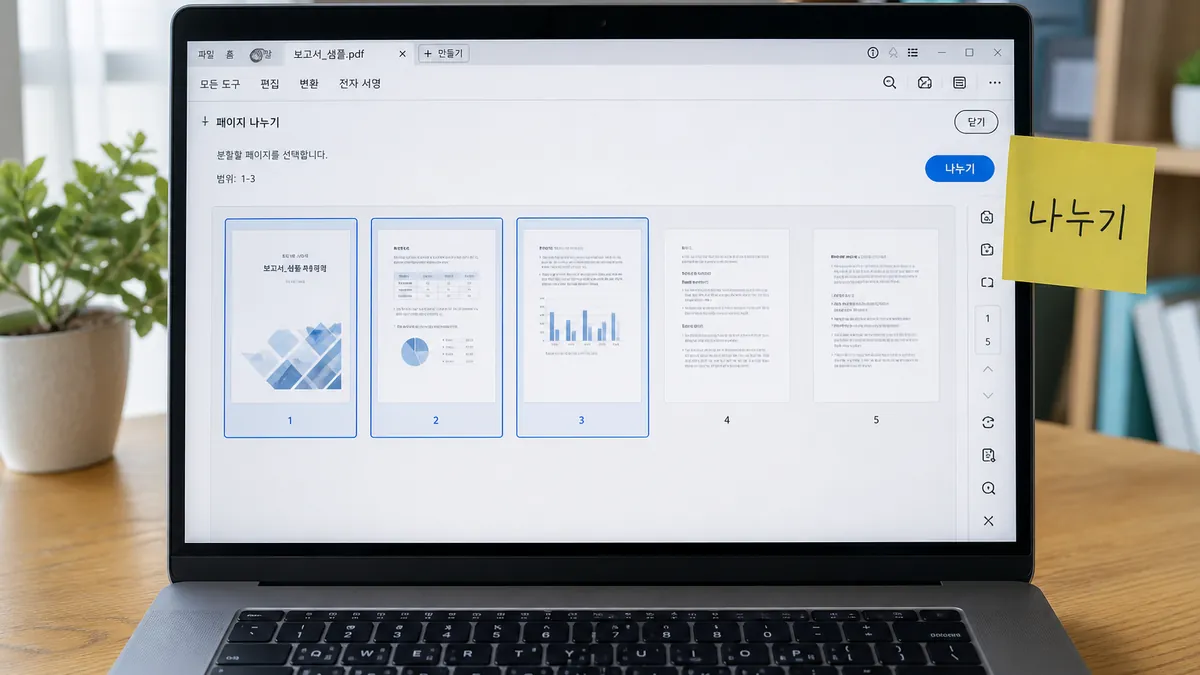
Headline job on the English URL, 2 September 2026: pull out just the pages you need as one file, or split every page into its own file. A run is pick one PDF, choose a mode, type a range (or leave it empty), press Split, download. The Korean-language twin at /pdf-split-tool/ is the same family with Korean chrome. English readers should stay on /en/pdf-split-tool/.
3-1. 📑 Two modes: range as one file, or one file per page
Range as one file gathers the pages you chose into a single PDF. The live page’s example job is “just send the application” — two sheets out of a forty-page packet, not the whole booklet. One file per page turns each chosen page into its own file. Handy for peeling apart a stack of scanned receipts. You get one Download button per page, so with a long range the page itself suggests working in two or three smaller passes.
3-2. ✍️ How to write a range
Live syntax, quoted in spirit from the English guide: 1-3 means pages 1 through 3. 1-3, 7 means pages 1–3 plus page 7. 10-12, 5 is valid out of numeric order; the result follows the order you typed. Leave the box empty and every page is included. That empty-range trick plus “One file per page” is also how the FAQ says you learn the page count when you do not know it yet.

3-3. 📐 Page numbers, removal, and passwords
The live English “worth knowing” block is clear on outcome: even when a cover uses Roman numerals, the first sheet is page 1 for this tool. Pages outside your range leave nothing behind — they are genuinely removed, not merely hidden. Password-protected PDFs will not open. Remove the open password first if you are allowed to. ISO 32000-1:2008 clause 7.6 is the encryption chapter; Adobe’s free copy matches the 2008 ISO technical content. The Library of Congress PDF family record (FDD000030) lists encryption and password protection as technical protection. The tool will not break someone else’s password. That refusal is a safeguard, not a tip sheet for stripping encryption.
✅ Five checks before you send the slice
A Split PDF download is not a notarised original. The footer temperature on the tool matches the merge sibling: this tool only rewrites the file structure; always open the result once before sending anything important. Five checks. None of them need an account.
4-1. 🔌 Offline and the empty Network panel
Load the English tool while you still have a connection. Then, for the actual extract: Network tab on, press Split, confirm 0% of that click becomes a new request. Optional: disconnect and press Split again. Why now: the no-upload tool is already live.
| Check | Do | Pass |
|---|---|---|
| 1. Network | DevTools → Network → Split | No new request |
| 2. Offline | Airplane mode, Split again | Same download |
| 3. Range | Confirm 1-3, 7 matches the job | Order matches what you typed |
| 4. Open once | Open the download before email | Only the pages you meant |
| 5. Password | Unlock first if encrypted | File opens in the tool |
4-2. 👁️ Open the download once
Always. The live page’s forty-page packet example is the right temperature: confirm you got the two application sheets, not a blank cover and a table of contents. Confirm the pages arrived in the order you typed. The tool does not certify legal validity. It rewrites structure. Adobe’s 1.7 text has been the ISO 32000-1 wording since 2008. PDF 2.0 arrived as ISO 32000-2 in 2017, with a dated revision in 2020.
📎 After the split: merge, rotate, or photos
The split screen peels pages out of one file. It does not glue several files into one. When you need the slices back together, use merge. Sideways scans belong on rotate. JPG or PNG shots belong on image-to-PDF first.
5-1. 🔗 Put the pieces back with merge
The live split guide points to Merge PDF when you want the pieces joined again. For the longer privacy write-up on joining without a server hop, see Merge PDF Without Uploading: 5 Checks. That article is the join angle. This one stays on extract.
5-2. 🔄 Sideways scans and photo stacks
Rotate changes the rotation value stored on each page. Right 90° is clockwise; left 90° the other way; 180° flips. It does not redraw pixels. Image to PDF takes JPG and PNG. HEIC from an iPhone will not go in as-is. Ten receipt photos become one file first; photo text is not searchable. If you then need only three of those sheets for a claim form, come back here and peel them out.
Ad
celimax The Vita A Retinal Shot Tightening Booster5% off with code JXLAB0306View details ›
Affiliate link — I may earn a commission.
❓ FAQ
A Split PDF pass on the English tool stays in the tab. Quote: nothing uploaded, nothing stored. Two modes: range as one file, or one file per page. Password files stay locked. Open the download once.
6-1. ❓ Can I Split PDF without uploading?
Yes. The English tool says files are processed inside your browser and that nothing is uploaded or stored. Verify with the Network panel on the Split click, or by going offline after the page has loaded. I would rather you run that check than trust a paragraph.
6-2. ❓ What is the difference between the two modes?
“Range as one file” returns a single PDF that contains only the pages you listed. “One file per page” returns a separate download for each chosen page. For long stacks of receipts, the live page recommends smaller ranges so you are not juggling dozens of buttons at once.
6-3. ❓ Does this change my original file?
No. The live FAQ is blunt: your original is never touched — a new file is created and handed to you. Close the tab when you are done if the packet was sensitive.
6-4. ❓ Why won’t a locked file open?
ISO 32000-1:2008 7.6 encrypts strings and streams. The tool will not break that. Remove the open password first if you are allowed to. The live page treats that refusal as a safeguard rather than a limitation.
6-5. ❓ Is Split PDF safe for ID scans?
Safer than posting the same scan to a random upload form. On this page’s claim, the bytes never leave the tab. Still: you opened the file in a browser. Close the tab when you are done. Open the result once. I will not call it military-grade.
6-6. ❓ I do not know how many pages it has
Leave the range empty and run “One file per page” once — the live FAQ says the number of files you get is the page count. Then run again with a tighter range if you only need a few sheets.
I would rather you run the Network test than trust marketing copy. A Split PDF feature that cannot survive airplane mode is not the feature this page is describing.
Sources (checked 2 September 2026):
- JLOGUE English split tool — live copy quoted above
- W3C File API (Editor’s Draft)
- MDN — File API
- Adobe copy of ISO 32000-1:2008 (PDF 1.7), clause 7.6 Encryption
- Library of Congress — PDF family (FDD000030)
Quotes are from the live English tool and from the official documents linked above, fetched 2 September 2026. Not a legal opinion, not a penetration test, and not a promise that a future revision of the page will keep the same wording. Open the downloaded file before you send it. Individual files and devices vary. Estimate for reference, not a certified output.